
Day Long classes have priority along with Period Long classes.
Order on report card - Will look at the Priority on the class profiles of the Day Long and Period Long classes.
If it is a Day Long class, then the subjects will sort based on the priority set for each subject.
Example:
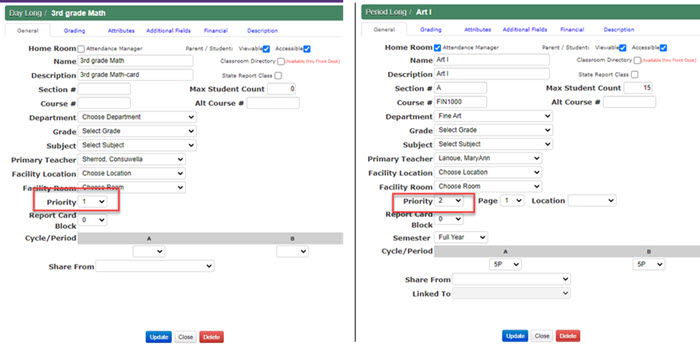
Each class profile will have a Priority setting option. This is the first priority that the report cards will look at. In the class
profiles below, there is a Day Long class called '3 grade Math' with a Priority of 1 and a Period Long class with a Priority of 2.
This means the Day Long class will print first and the Period Long class will print next.
Since Day Long classes have subjects in them, teachers will be able to add a Priority to those as well. In the Day long
class example, it has two subjects - Math and Spelling. This class has given Spelling as Priority 1 and Math as Priority 2.
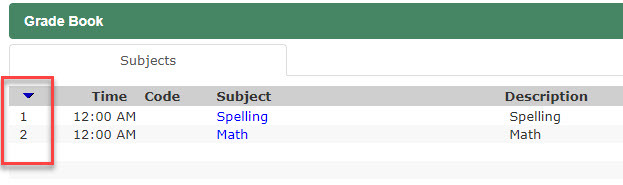
Since the Day Long class has a Priority of 1, it will print first and the subjects will be sorted for the Day Long class.
The Period Long class will then print next.
So, this is how the grades will display on the report card:
Day Long class 3rd Grade Math - Spelling subject
Day Long class 3rd Grade Math - Math subject
Period long class Art 1