
A Site Admin can view PAN activity under Site Admin | System Logs | Daily Overview.
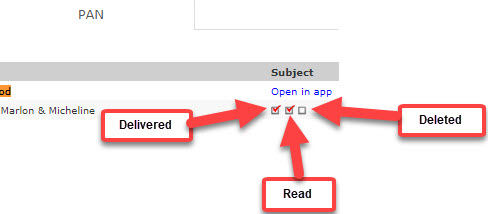
The first box will be checked once the user has logged into Sycamore.
The second box means the user has clicked on the PAN.
The third box will be checked when the user has clicked the Delete button on the PAN.
The Mobile app tracks this process slightly differently. The first two boxes will not be checked until the user actually clicks on the PAN.