
Teachers are able to change their grading configuration from one term to the next.
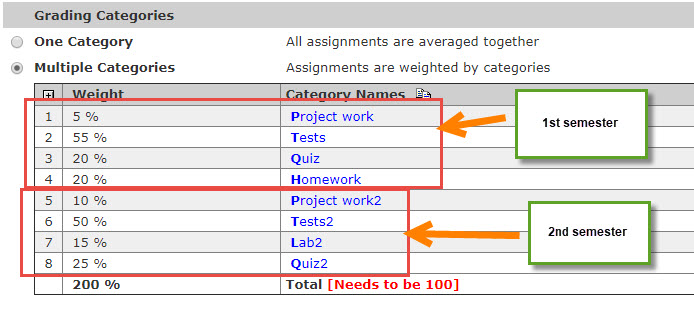
Ex: The teacher can leave the 1st semester categories in place and create a new group that is also equal to
100%. The Total will say it needs to be 100, but it is ok for it to be 200. The teacher can then select the 2nd
semester categories when creating assignments. I recommend adding something to the Category Name to
denote that it is for 2nd semester (e.g. Tests2). This way, the teacher will know which category to select from, so
that they get the correct Weight.
This solves 2 issues that would be caused by editing current Categories:
1. From a parent login, they will see the correct %'s for the given marking period, and only those categories
that are used will show so it won't be confusing.
2. From a teacher perspective, the Grade Summary | Current and Posted grades will not change for past quarters.
3. Teachers can have accurate grades for the new marking period that uses new categories while still finishing
grades for the previous marking period.
It is still a good idea to LOCK past marking periods after grades have been finalized in
Grade Mgr| Configuration.