
If you are trying to print Avery labels and are getting labels that line up at the top of the sheet, but the
closer you get to the bottom of the sheet, the labels become out of alignment, the issue is either your
Adobe Print function settings or your printer is modifying the document margins before printing and in
return, causing the alignment issues.
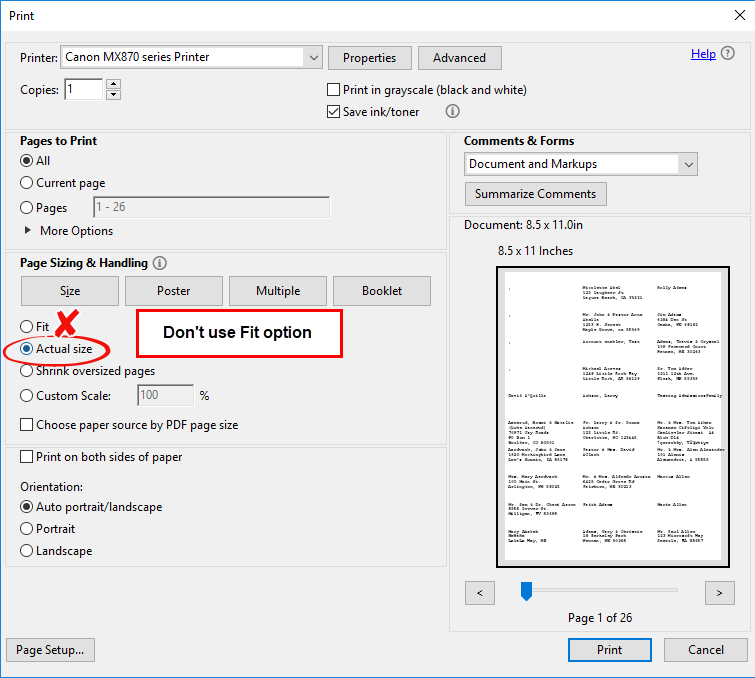
For PDF labels, it may be within Adobe's PDF print function. The Adobe print window will open that includes
For PDF labels, it may be within Adobe's PDF print function. The Adobe print window will open that includes
a drop down menu of printers to select, page range, view, etc. Underneath Page Sizing & Handling (on left
of window) Adobe automatically sets Size Option to "Shrink oversized pages". Change this to "Actual Size".
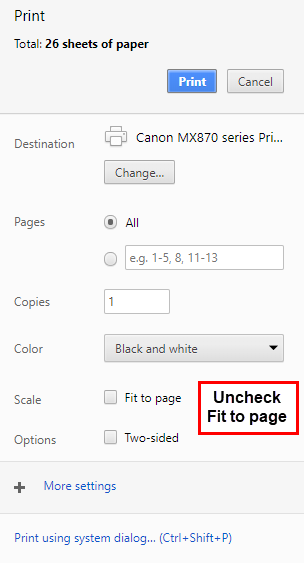
With a Mac, the option you will choose is "No automatic page scaling". Here are some screen shots of what
the settings may look like when you click
 button:
The solution may also be to configure your printer to not modify margins. This is going to be different for
each printer and you will need to experiment to find the right setting on your printer. These settings are most
commonly found under the 'Preferences' or 'Property' button for your printer.