
Barcodes are available on Student (and Employee) Badges and ID cards. These barcodes can be used in many different areas within Sycamore Education, including the Cafeteria area.
Barcodes for students can be created by going to Administrative | Back Office | Reports. There are three reports that will produce barcodes for students.
- Student ID Badges
- Student ID Cards
- Student Names / Barcodes (list of students and barcode by class)
Barcodes for staff can be created by going to Administrative | Human Resources | Reports | Employee Badges. Each staff needs to have an ID assigned to them. You can do this in each individual profile or there is a report under Human Resources called, Employee ID, that will allow you to assign IDs to all staff. Note: For Employee ID's to read into the bar code scanner, they need to be all numeric so the system differentiates them from the alpha-numeric Student Codes.
If the student and/or staff does not have their ID badge with them, and there is no "cheat sheet" with a list of bar codes, the lunchroom cashier can also type in the ID into the ID field to be able to run the charge.
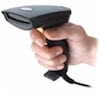 There are many different bar code readers available for your school. Shop for the best rated one in your budget, making sure it will read Code 39.