
The Site Admin and anyone with School Calendar permission can sync the School
calendar as long as they also have their individual Calendar sync enabled for
themselves. Also, they would need to have access to the calendar on the
Google side.
Steps to enable individual Calendar sync:
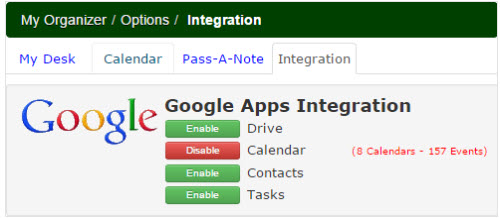
1. Go to My Organizer| My Calendar| OPTIONS button.
2. In the Integration tab, click the ENABLE button. You will then need to enter
your Google App email account address and password to give Sycamore
permission to sync with it.
3. Go back to My Organizer| My Calendar and click on the Google Calendars
list button (orange button) and make sure this School level Google Calendar
is on the list. All calendars connected to the given email address will show
on this list, not just the primary calendar. Make sure you have Synchronize
set to No in this area (click on the calendar name to change that setting).
Once these steps have been done, the individual will see the orange Google sync button
under School - Calendar.