
Using Google SSO for Students
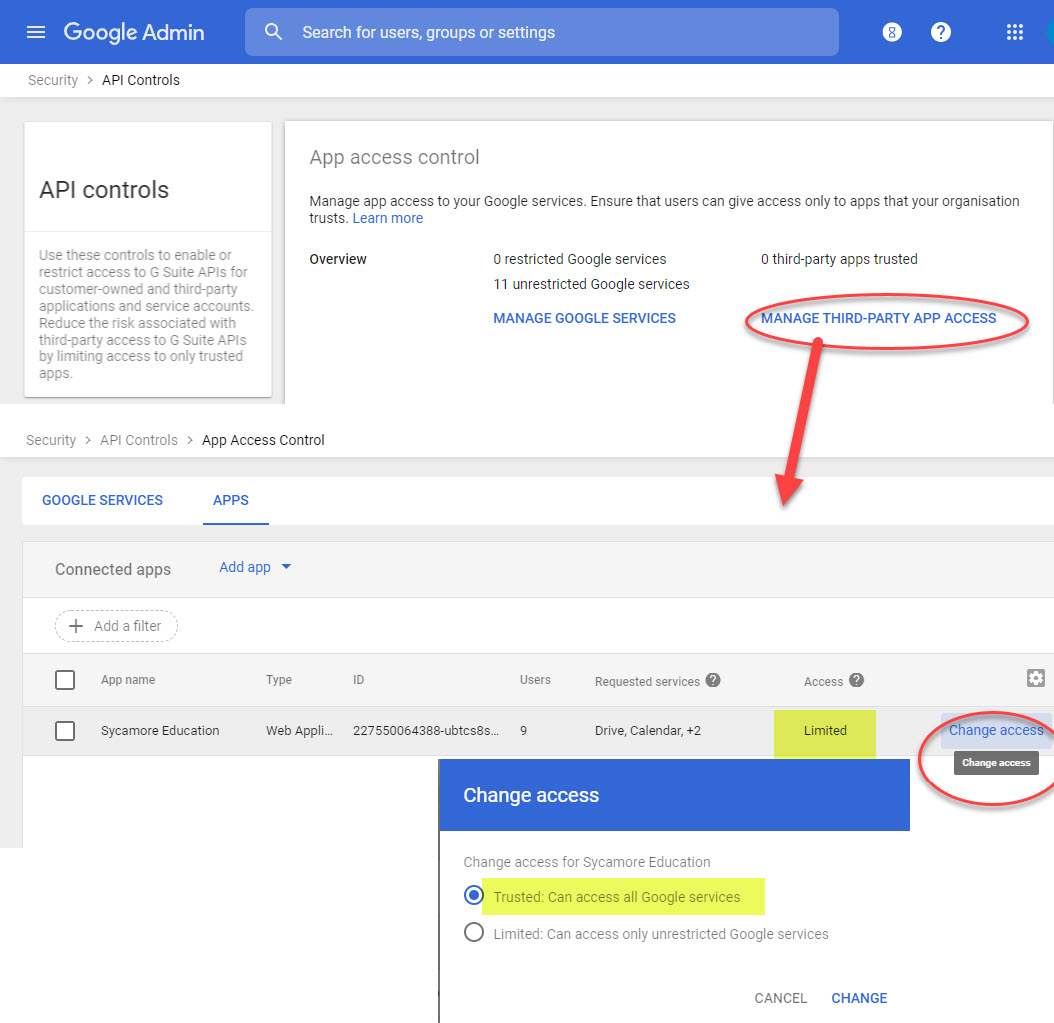
In order to be able to sync Sycamore with Google, Sycamore Education has to have a Trusted Site API access in your Google Admin. Go to Security| Access and data control | API Controls. That will open API Controls; click on Manage 3rd Party App Access. Make sure Sycamore Education is on that list, and set access for Sycamore as Trusted.
1. The student's gmail account will need to be entered on the user's profile.
2. Make sure the students' logins have been enabled. Go to Back Office Mgr | Reports:
- Use the Student Account Enabler to enable their account. This is done by grade level.
- Use the Student Login/Password report to email them their Sycamore username and the link to create their password. This is also done by grade level.
3. They will need to log into Sycamore using their Username and Password and accept the terms of service that comes up when they log in for the very first time. This will "activate" their Sycamore account.
4. If they have already accepted the terms of service on the Google side, then they should be able to "Sign in with Google."
https://cloud.google.com/architecture/identity/single-sign-on